

Configure runners and Terraform state#
Every Deployment needs one customer-owned runner and one protected Azure Blob state location. Reply CMP blocks Plan and Apply until both are ready.
Navigate: Provisioning → Deployments → select a Deployment → Runner & state.
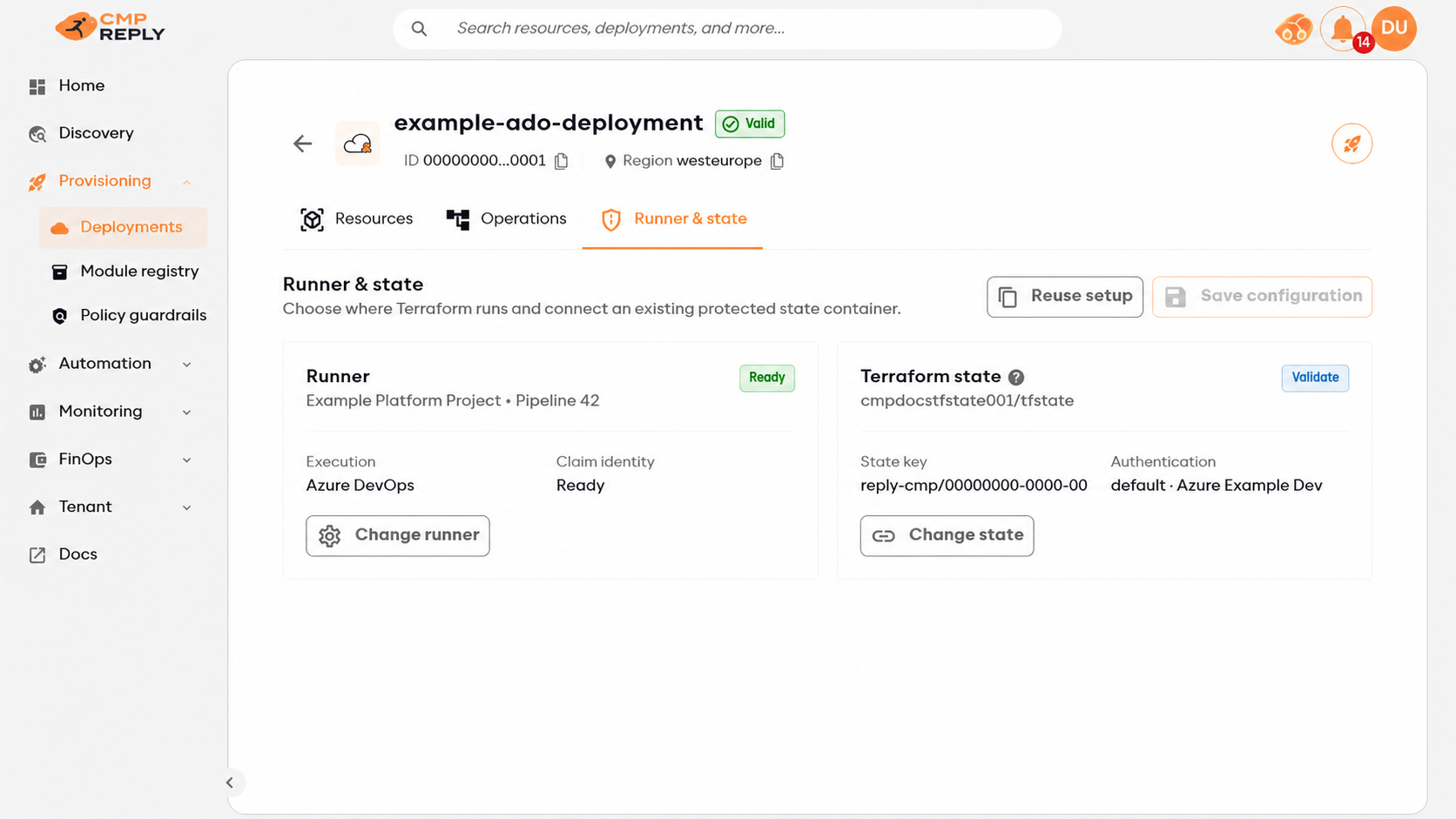
The page shows the runner, callback trust and the Azure Connection used for state.#
Understand the three credentials#
Purpose |
Selected in Reply CMP |
What receives it |
|---|---|---|
Dispatch |
Azure DevOps or GitHub credential |
The control plane uses it to start only the configured pipeline or workflow. |
Terraform providers and state |
Cloud Connections linked to the Deployment |
The runner claims their exact vault versions once for the operation. Terraform uses them for the matching provider aliases; one linked Azure Connection is also selected for Blob state. |
Reply CMP callback |
Tenant claim identity managed by Reply CMP |
The runner uses short-lived workload identity federation to claim the operation and report status and evidence. |
Repository and dispatch secrets never reach Terraform. Cloud Connection secrets are never returned to the browser or stored in the runner repository, Environment, pipeline variables, plans, state configuration or logs.
At the start of every run, the current starter creates a new RSA-3072 key pair in the runner process. It sends only the public key while claiming the operation. Reply CMP wraps the one-shot nonce and the exact pinned Connection versions in authenticated JWE encryption (RSA-OAEP-256 with A256GCM) for that key. Terraform input is encrypted with the same run key and is accepted only with the nonce bound to that key. The private key is never persisted, exported, sent to Reply CMP or inherited by Terraform; it is disposed when the process ends.
The runner verifies the encrypted payload type, key identifier, tenant, Deployment, operation, issue time, expiry and immutable input checksum before exposing any value. Claim and input responses are valid for at most 10 minutes and never outlive the operation; the operation itself can continue for its full configured duration after the payload has been validated. The runner masks Connection values, makes them available only as ephemeral Terraform variables and process environment, then clears them when the operation ends. A finalizer handoff retains only the one-shot callback nonce in a runner-private temporary file (0600 on the supported Linux agents); the finalizer deletes it after use. No callback can complete an already claimed operation without that nonce.
Rotating a Connection does not alter an operation already created. A new Plan or Apply pins the latest vault version available at that moment.
Reuse an existing setup#
Select Reuse setup when another Deployment in the tenant already uses the intended runner and Storage account.
Reply CMP copies references only. Review the Azure Connection alias and validate the container before saving. The new Deployment receives its own state key, lock and operation history; it never shares another Deployment’s state object.
Configure Azure DevOps#
Download and commit the Azure DevOps starter ZIP, then create a pipeline from azure-pipelines.yml.
Prepare Azure DevOps#
Keep the runner files on a protected branch and note the pipeline’s numeric definition ID.
Keep the committed
REPLY_CMP_EXPECTED_API_BASE_URLtrust pin unchanged. The production starter pinshttps://apis.welkincmp.com.Make sure the selected Microsoft-hosted or self-hosted agent can reach Reply CMP and the state Blob endpoint.
Store an Azure DevOps PAT under Module registry → Credentials. It needs to queue the pipeline and, during callback setup, manage Service Connections and protected pipeline-resource permissions in that project.
Link the cloud Connections that Terraform must use to the Deployment. No Azure DevOps infrastructure service connection is required.
Complete the Runner panel#
Select Change runner, choose Azure DevOps pipeline, then:
select the Azure DevOps credential;
select or type the organisation URL, project and numeric pipeline ID;
under Secretless Reply CMP callback, select Set up callback;
wait for the green connected status, then select Use runner.
The organisation URL begins with https://dev.azure.com/. Project and pipeline fields remain editable when discovery is unavailable.
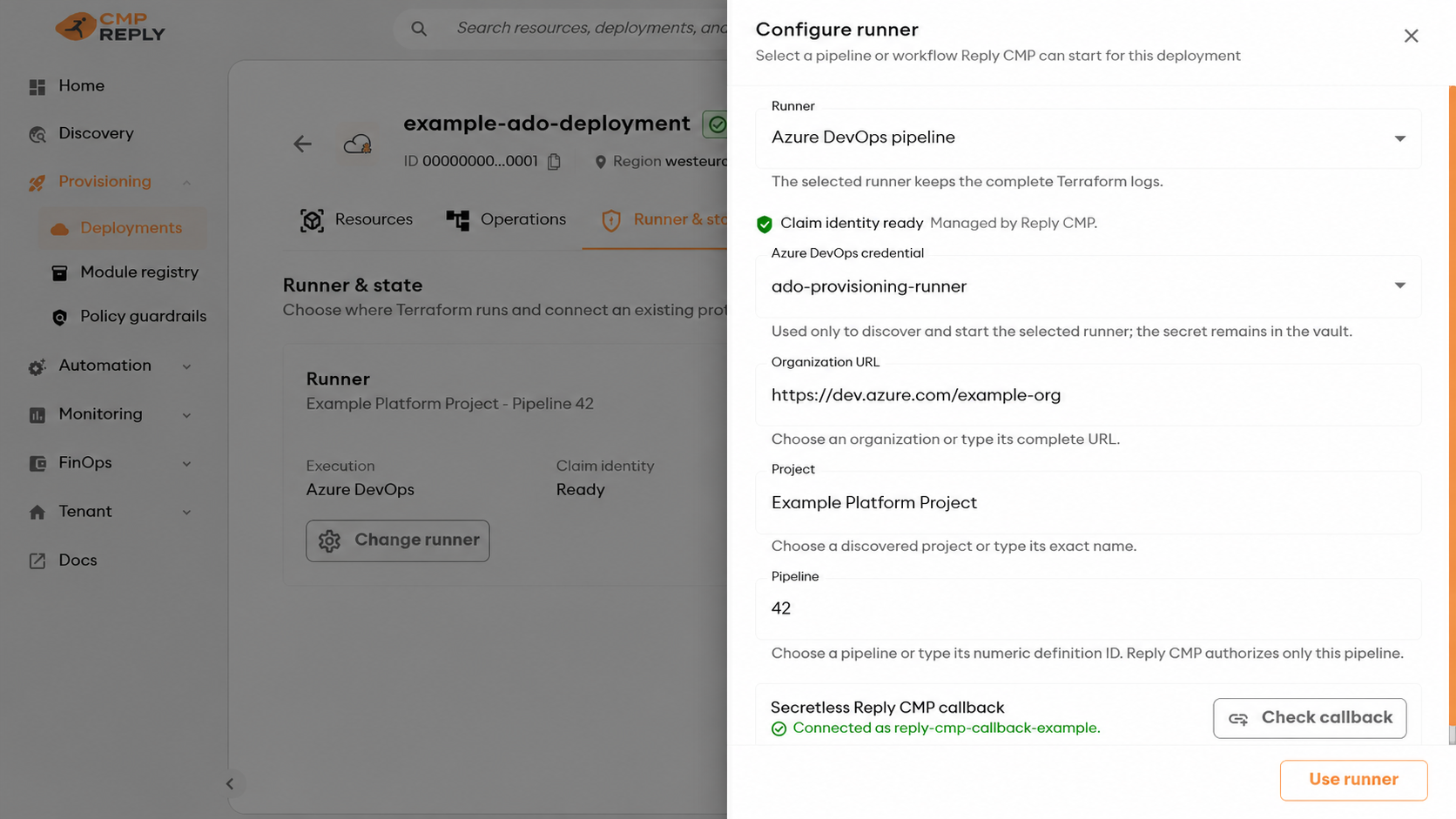
The callback connection talks only to Reply CMP. Terraform uses the Deployment Connections instead.#
Reply CMP creates one convention-based claim identity per tenant and reuses it across Deployments. The UI shows Claim identity ready; customers do not manage this app registration or create a client secret.
The shared app registration can contain several federation records: one for each callback trust that is still referenced by a configured Deployment or active operation. After runner reconfiguration or Deployment deletion, Reply CMP removes only unused records whose names prove that they are platform-managed. It preserves records still needed by an in-flight operation, never deletes customer-managed federation, and keeps the tenant claim identity and its Reply CMP app-role assignment. The shared identity itself is removed only by the separate tenant-offboarding process.
If automatic callback creation fails, the panel reveals Create the connection manually:
open Azure DevOps → Project settings → Service connections → New service connection;
choose Azure Resource Manager and the manual app-registration option with Workload identity federation;
copy the callback-only values shown by Reply CMP;
leave access for all pipelines disabled and save as a draft;
return to Reply CMP and select Connect existing.
Reply CMP completes federation and authorises only the selected pipeline. This connection has no role on customer subscriptions and is not used by Terraform.
Configure GitHub Actions#
Download and commit the GitHub starter ZIP.
Prepare GitHub#
Commit
.github/workflows/reply-cmp-provisioning.ymlon the default branch and keepworkflow_dispatch,id-token: writeandcontents: read.Keep every third-party action pinned to a reviewed commit.
Keep the production endpoint trust pin unchanged unless Reply CMP support provides a different endpoint.
Store a supported GitHub credential under Module registry → Credentials.
Link the cloud Connections that Terraform must use to the Deployment. Do not copy their values into GitHub secrets or variables.
Runtime dispatch needs repository Contents: Read-only and Actions: Read and write. Set up environment additionally needs Administration: Read and write and Environments: Read and write; see Module registry credentials.
Complete the Runner panel#
Select Change runner, choose GitHub Actions, then select the credential, repository, workflow, and protected branch. Select Set up environment.
Reply CMP creates a dedicated reply-cmp-<deployment-id> Environment, restricts it to the selected branch and binds it to the tenant callback identity. The Environment is callback-only: it contains no Azure client, subscription, tenant, Connection secret or cloud-provider credential. The callback client and operation identifiers are signed dispatch inputs, while GitHub supplies a short-lived OIDC token for the exact protected Environment.
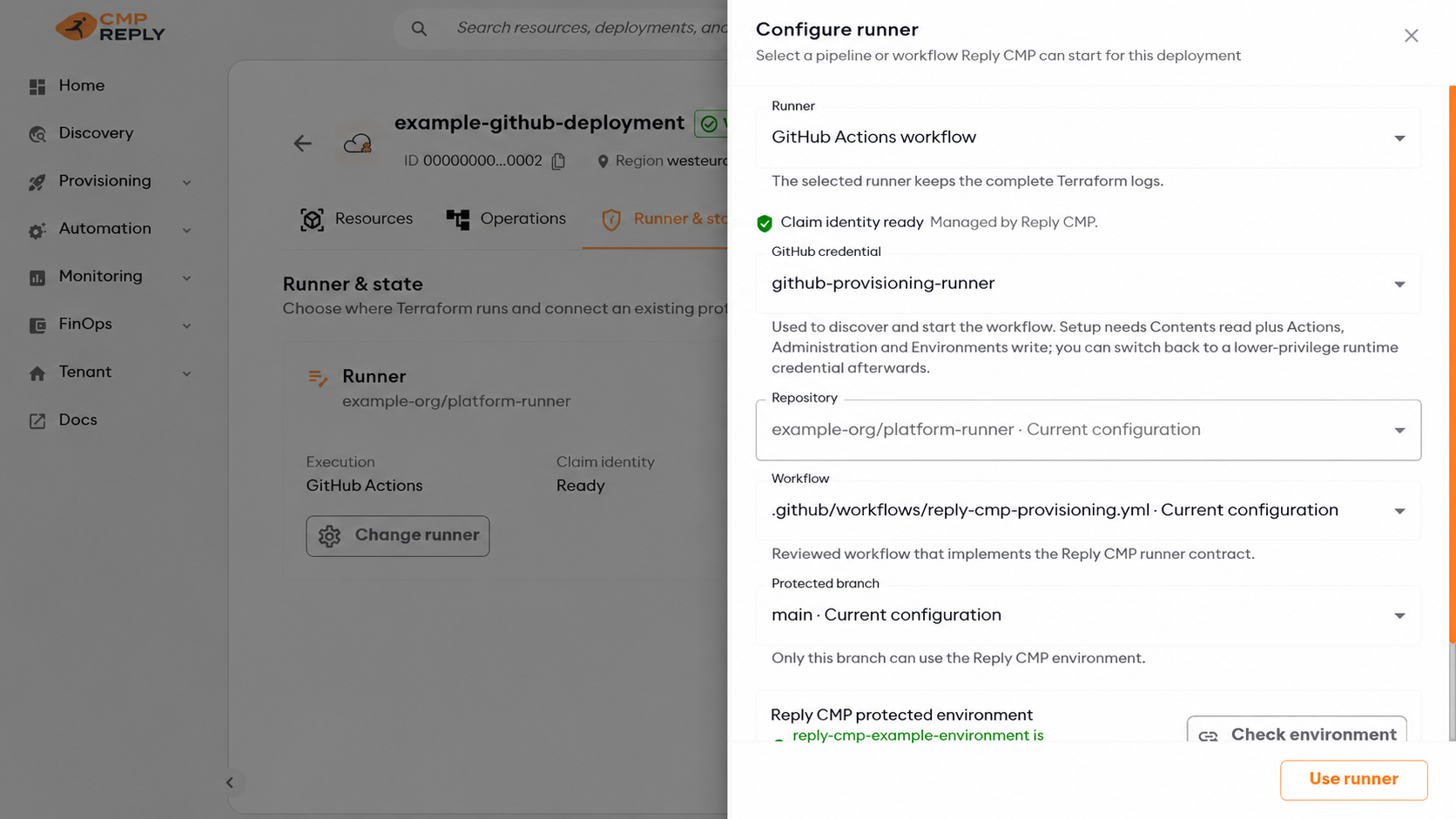
The protected Environment establishes callback trust. Cloud and state credentials still come from the Deployment Connections.#
The first setup can enable GitHub’s immutable OIDC subject for an older repository. Because this is repository-wide, review other customer-managed OIDC federations in that repository before their next run.
When a runner fails#
Both starter pipelines run the finalizer even when the Terraform step fails. The finalizer uses a fresh callback token and the runner result retained in the runner’s temporary directory. Keep the finalizer and cleanup steps enabled and do not remove the result file between them.
If a policy-denied Apply expires before the runner completes, Reply CMP closes
the operation as TimedOut when it receives the authenticated failure result.
The deployment lock is then released through normal operation reconciliation.
An Apply that may have started Terraform is handled conservatively as
UnknownOutcome; investigate the tenant-owned Terraform state before using the
controlled recovery action. Do not delete the SQL lock or start another Apply
while the operation is active.
Connect existing Terraform state#
Reply CMP does not create the Storage account or container. Prepare them through the customer’s normal cloud process, link the responsible Azure Connection to the Deployment, then select Change state.
Important
State currently supports Azure Blob only. Without an active read-write Azure Connection linked to the Deployment, state cannot be configured.
Select State Azure connection. The list contains only active read-write Azure Connections already linked to this Deployment.
If several Azure Connections are linked, choose the intended alias. The default Connection appears as
default; named aliases appear exactly as configured on the Deployment.Select the resource group, Storage account and existing private Blob container in that Connection’s subscription.
Check State authentication. It identifies the exact alias and Connection that will authenticate Terraform.
Select Validate storage, correct any failed protection, then select Use state.
Select Save configuration on the Runner & state page.
Start Plan. The runner uses the version-pinned secret of the selected Azure Connection to write a disposable probe Blob, acquire and release a lease, and delete the probe before Terraform opens the backend.
The selected Azure Connection service principal needs:
management-plane read access to inspect the Storage account and Blob protection settings;
Storage Blob Data Contributorat the narrowest practical state scope, normally the container;network reachability from the selected runner to the Blob endpoint.
It does not need a GitHub federation or a separate Azure DevOps infrastructure service connection. Its client secret remains in the Reply CMP tenant vault and is released only in the one-shot operation claim.
Save-time validation requires HTTPS only, Microsoft Entra authentication, Shared Key disabled, anonymous Blob access disabled, TLS 1.2 or later, Blob versioning, and at least 14 days of Blob and container soft delete. The runner preflight additionally verifies actual write, lease and delete access without opening the real state object.
Public and private endpoints are supported. A private endpoint or restrictive firewall requires a runner with the corresponding network path.
Reply CMP generates the deterministic state key. Do not enter a state key, storage key, SAS token or connection string.
Provider aliases and multi-cloud operations#
Every linked Connection produces one Terraform provider configuration:
the provider’s default Connection has no alias;
additional Connections use their Deployment alias;
module-to-provider mappings are generated only from reviewed module requirements.
For Azure Blob state, connectionAlias selects one of the linked Azure provider configurations. The exact same pinned credential version authenticates both that Azure provider alias and the state backend.
Azure Connections can use Global or China. Each Azure provider alias uses
its Connection’s instance, and the state backend uses the instance of its selected
Azure Connection. China state storage is accessed through
<account>.blob.core.chinacloudapi.cn. Global state can be used with China
provider aliases, and China state can be used with Global aliases; each provider
keeps its Connection’s cloud. The runner must be able to reach both clouds.
Use the current complete starter runner scripts when adding China Connections. Older scripts assume Global state endpoints. Reply CMP callback authentication and the Azure DevOps/GitHub runner remain independent of the target cloud; choosing China does not move the Reply CMP platform or its callback identity into Azure China.
AWS and GCP Resources can participate in the same operation. Their linked Connection credentials are claimed and injected in the same one-shot exchange. Azure Blob remains the shared state backend, so at least one read-write Azure Connection is still required.
State locking and later changes#
The selected Azure Connection alias, subscription, resource group, account, container and generated key become immutable before the first potentially mutating successful Apply. This prevents a later edit from silently moving Terraform to another state or identity.
Runner settings may still change. Connection credential rotation is supported because each new operation pins a new immutable vault version. Moving locked state or changing its Connection alias requires a controlled migration.
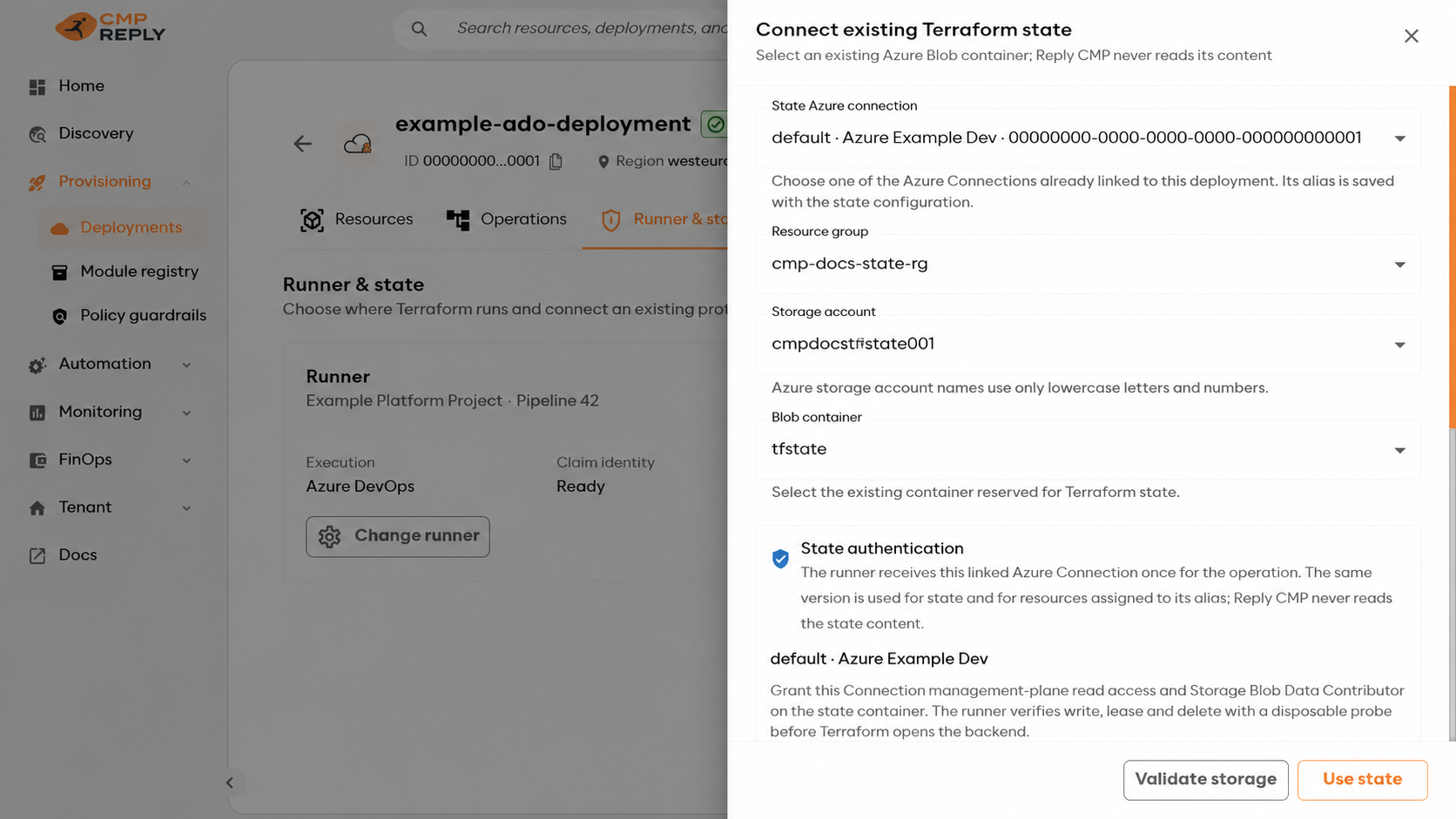
After the first successful Apply, the state details panel shows the locked location and its required protections.#
Adopt an existing Deployment#
Connecting an empty state container does not import live resources and must not cause Terraform to recreate them.
When the old state is available and trustworthy:
stop old pipelines and freeze Deployment changes;
back up the old state and record its version or checksum;
configure the new runner and state in Reply CMP, then copy the complete old state to the exact deterministic key displayed under Runner & state;
keep the same module versions, provider aliases and Resource inputs;
start Plan and require
0creates,0deletes and0replacements;review any expected in-place metadata change;
start Apply only after that Plan is safe, then require zero drift from one final Plan.
If an individual object is missing from state, Plan returns state-adoption-required with the stable Terraform address. Use a reviewed one-time migration job to import the exact provider object at that address, then Plan again.
Warning
Never bypass state-adoption-required, delete a live object to hide the result, or copy one state file into several Deployments. Keep the old state and runner frozen until the final zero-drift Plan succeeds.
Before the first Plan#
Confirm:
runner, callback and state show ready;
State authentication shows the intended linked Azure Connection alias;
every linked Connection is active and the state Connection is read-write;
the selected Azure Connection can inspect and access the state container;
the runner can reach Reply CMP, the cloud APIs and the Blob endpoint;
the committed endpoint trust pin matches the Reply CMP environment;
the runner uses Terraform
1.15.8and the current starter scripts.
Older starter scripts cannot claim operations that use the encrypted payload contract. Replace the complete runner/ directory and pipeline/workflow template together; do not copy only the main script.