

CMP Agent#
The CMP Agent is a conversational AI assistant built into Reply CMP. Ask it questions in plain language — it queries your cloud data, runs live provider metrics and log queries, manages alert rules, and can produce formatted HTML reports — all without leaving the platform.
Opening the CMP Agent#
Click the  mascot in the top navigation bar. The agent panel opens on
the right side of the screen without navigating away from your current view.
mascot in the top navigation bar. The agent panel opens on
the right side of the screen without navigating away from your current view.
The agent is always accessible, on every page. You can work in the main view (switching tabs, checking dashboards) while the conversation persists in the side panel.
Conversations and Feedback#
CMP Agent conversations are saved so you can return to previous work, resume context, or review an answer later. You can create a fresh conversation for a new topic and delete old conversations when they are no longer useful.
Use the message feedback controls to mark an answer as helpful, unhelpful, or neutral. Feedback helps improve answer quality over time, but it does not change your permissions, expose additional data, or make the Agent bypass the same access rules used by the UI.
What the Agent Can Do#
The CMP Agent covers multiple capability domains. It only works with the areas your role allows you to access, so a user who can read Discovery but not FinOps will not get cost answers through the Agent.
At a high level, the agent works like this:
Phase |
What happens |
|---|---|
Planning |
The agent reads your goal and chooses which data sources are needed |
Data lookup |
It reads the relevant Reply CMP data under your tenant and permissions |
Evaluation |
It checks whether the data answers the question or whether more context is needed |
Validation |
Before replying, it verifies that the answer is supported by the data it collected |
Final response |
The agent writes the answer in the language of your request and may attach an HTML report |
The agent avoids showing internal identifiers unless you explicitly ask for technical details. It translates raw fields into plain-language answers and suggests follow-up questions when useful.
1. Resource Discovery Queries#
Query your resource inventory — counts, filters, distributions, properties, and relationships. The agent uses the same rationalised Discovery model shown in the UI, including support level, category, type-specific metadata, and resource graph data.
Examples:
“How many Azure VMs do I have?”
“List all untagged GCP resources”
“Which resources are in the
productiongroup?”“Show distinct resource types across all connections”
“Show the upstream and downstream relationships for this VM”
“Which resources are CostOnly rather than Full Discovery resources?”
“Show type-specific properties for the production load balancer”
2. Cloud Cost Analysis#
Query cost data with filters, group-bys, and time ranges — the same data powering the FinOps Analyze view.
Examples:
“What were our top 5 most expensive resources last month?”
“Compare this month’s Azure costs to last month”
“Show costs by connection for Q3”
“Which groups are over budget?”
3. FinOps Allocation Management#
Inspect and manage the allocation structures used by FinOps reporting: Organisation groups, Environments, Projects, owners, rules, and budgets.
Examples:
“Show me the current allocation hierarchy”
“Create an Environment called Production”
“Create a Project called Data Platform and add a rule for tag project = data-platform”
“Create a Platform Engineering group under Engineering and assign Alice as owner”
“Add a monthly budget of 5000 EUR to the Mobile team”
“Which resources are still unallocated?”
“Remove the obsolete Sandbox project”
Note
Creating, editing, or removing allocation groups requires FinOps.Allocation / Write.
Budget changes also require FinOps.Budget / Write. The Agent asks for confirmation
before applying these changes.
4. Live Cloud Monitoring Queries#
Run live metric, log, and alert queries directly against your cloud providers — the same queries that power Monitoring dashboards.
Metrics:
“Show average CPU utilisation for my Azure VMs over the last 24 hours”
“What is the Lambda error rate for the
checkoutfunction in the last hour?”“Show GCP Cloud Run request count for the last 7 days”
Logs:
“Show the last 50 errors from the
AppServiceLogstable in Log Analytics”“Query Lambda errors from
/aws/lambda/checkoutin the last 6 hours”“Find all HTTP 5xx entries in Log Analytics from today”
Alerts / Alarms:
“Are there any active Azure alerts with severity Sev1 or higher?”
“Which AWS CloudWatch alarms are currently in ALARM state?”
“Show active GCP alert policies for Cloud Run”
Available monitoring data:
“What metric namespaces are available for my Azure subscription?”
“List available metrics for Azure Kubernetes Service”
“Which Log Analytics workspaces does the agent have access to?”
5. Alert Rule Management#
Inspect and manage the Alert Rules configured in Monitoring.
Examples:
“List all alert rules — which ones are currently Firing?”
“Show the full configuration for the
prod-cpu-highalert rule”“What is the state history for the
database-latencyrule?”“Disable the
staging-error-ratealert rule”“Run an immediate evaluation of the
prod-memoryalert rule”
Note
Toggling (enable/disable) an alert rule requires the Monitoring.AlertRule / Write
permission. Read-only operations require Monitoring.AlertRule / Read.
6. Savings Recommendations#
Ask about cost savings opportunities and cloud reservations. The agent uses advisory recommendations from tenant connections and reservation cost tracking from FinOps.
Examples:
“What reservations do we have expiring soon?”
“Summarise our top savings recommendations”
“What would we save if we acted on all High confidence recommendations?”
“Show ongoing Azure Reserved Instance costs”
7. Automation Policies#
Inspect automation policy definitions and active policy instances.
Examples:
“What automation policies are available?”
“List all active policy instances — which ones are enabled?”
“Show the last 10 execution runs for the
stop-dev-vmspolicy”“Which policy instances ran in the last 7 days and used the most credits?”
8. Provisioning#
Query Provisioning Deployments and the approved Modules available to your tenant.
Examples:
“List all active provisioning deployments”
“Which approved modules are available for Azure?”
“Show deployments that target the production connection”
9. Tenant and Platform Information#
Query platform metadata — connections, users, identity.
Examples:
“How many connections are configured?”
“List all users and their roles”
“What cloud provider is the
eu-prodconnection?”“Are we close to any tenant quota?”
“Show recent discovery or cost-refresh events”
10. Trigger Discovery#
Ask the agent to start a discovery sync for a connection. The agent will confirm with you before triggering.
Example:
“Trigger a discovery sync for the Azure production connection”
The agent responds: “Are you sure you want to trigger discovery for [connection name]?” → Type yes to confirm.
11. Report Generation#
Ask the agent to generate a full HTML report. The agent collects data from the relevant areas and produces a styled, downloadable HTML report.
Examples:
“Generate a cloud cost report for last quarter”
“Create a monitoring health report for this month”
“Generate an advisory report with savings recommendations”
The report is delivered as a download attachment directly in the chat.
Data the Agent Can Use#
Depending on your role, the CMP Agent can answer questions using:
Area |
Examples |
|---|---|
Discovery |
Resource inventory, support levels, provider metadata, tags, lifecycle, and relationships |
FinOps |
Costs, trends, forecasts, allocation groups, budgets, recommendations, and reservations |
Monitoring |
Live metrics, logs, cloud alerts, Alert Rules, dashboard definitions, and Azure Resource Graph queries |
Automation |
Available automation policies, active policy instances, execution history, and credits used |
Provisioning |
Deployments and available catalog templates |
Administration |
Connections, refresh history, tenant quotas, users, roles, and current user identity |
You do not need to know where each data point comes from. Ask in plain language and the agent chooses the right source.
Actions and Confirmations#
Most Agent capabilities are read-only. The agent asks for explicit confirmation before operations that change platform state or start background jobs.
Action |
What changes |
Permission |
|---|---|---|
Trigger Discovery |
Starts a background discovery scan for one or more connections |
|
Toggle alert rule |
Enables or disables an existing alert rule |
|
Evaluate alert rule now |
Runs an immediate alert evaluation |
|
Create/edit/remove allocation groups |
Changes FinOps allocation hierarchy, owners, rules, or budgets |
|
When confirmation is required, the chat shows a confirmation card. If you decline, the action is not executed.
Report Generation#
When you request an on-demand report from the CMP Agent, the agent first gathers the relevant data. If there is enough data to build a report, a separate report generation flow runs:
Stage |
What happens |
|---|---|
1. Data analysis |
Collected data is combined into a structured analysis |
2. Executive summary |
A dedicated AI pass writes business-level findings |
3. Detailed findings |
Tables, calculations, and chart descriptions are built from the collected data |
4. Insights and recommendations |
A consultant-style pass extracts actions, risks, and follow-ups supported by data |
5. Report assembly |
A final pass creates a polished HTML report with Reply CMP styling and charts |
6. Validation |
The service checks that the report is complete, uses real data, and contains no placeholders |
Note
Report generation takes approximately 30–60 seconds. The agent will display a “Generating html report…” status indicator while processing.
Language auto-detection: The report is written in the language of your query — the same language you used when requesting the report.
This on-demand chat report is different from the reusable FinOps Report Service used by FinOps → Reports. See FinOps Report Service for the scheduled report designer.
Inline visualisations: For non-report answers that contain numeric data, the agent renders Mermaid diagrams (charts, pie charts, flow diagrams) directly in the chat response without generating a file.
Example Conversation#
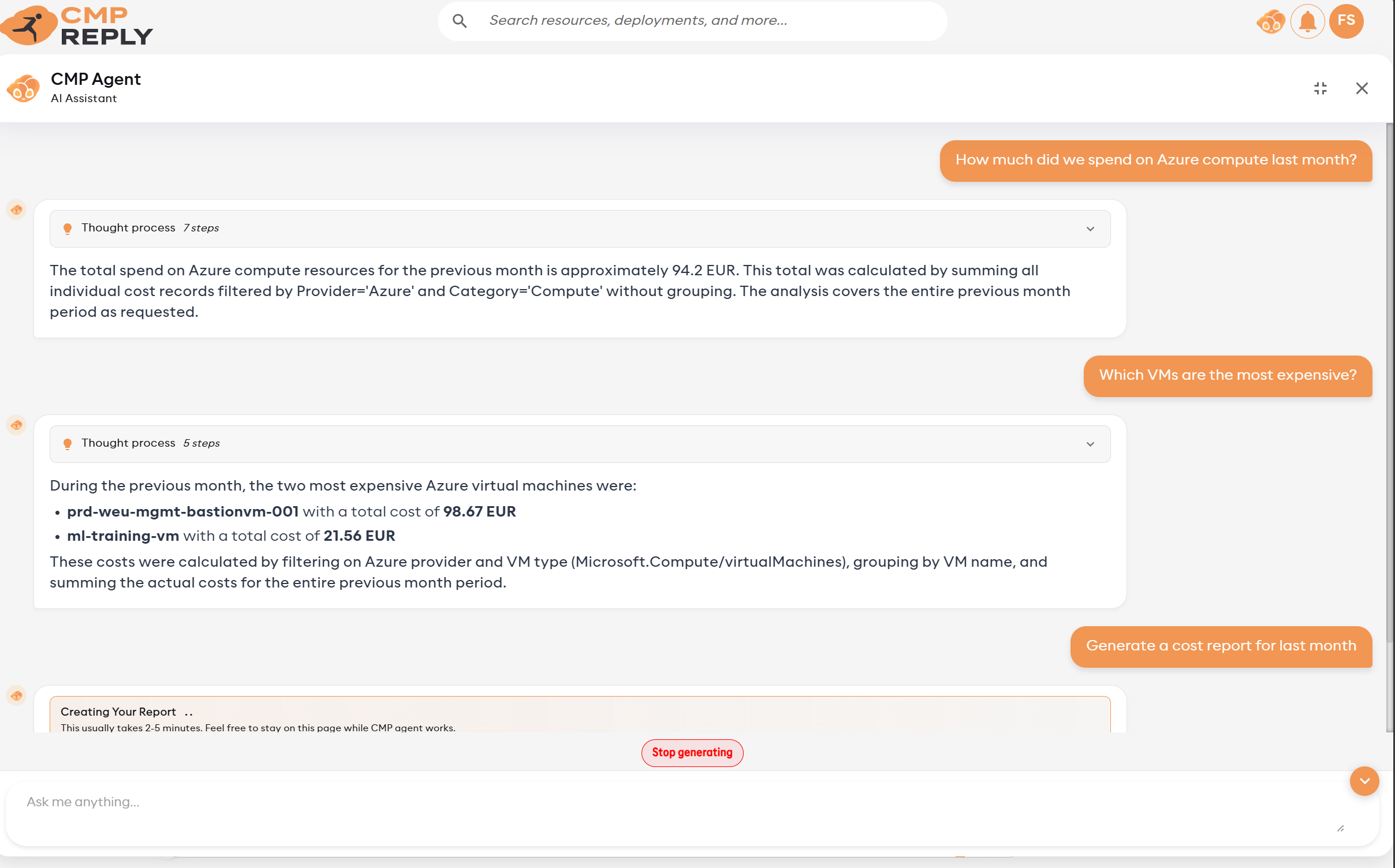
Limitations#
Limitation |
Detail |
|---|---|
T-1 cost data |
Cost data is refreshed up to the previous day. Today’s cost data is not yet available. |
Discovery freshness |
Inventory and relationship graph data reflect the last successful Discovery run for each connection. Trigger a manual sync when you need the latest topology. |
Live monitoring data |
Monitoring queries call provider APIs in real time and return current data. |
Cloud resources are read-only |
The Agent cannot create, edit, or delete cloud resources. Write actions affect Reply CMP state only: triggering Discovery, toggling/evaluating alert rules, or changing FinOps allocation data, each with permissions and confirmation where required. |
Report generation time |
30–60 seconds per report. Complex queries or large tenants may take longer. |
Very large results |
Very large answers may be summarized or narrowed so the chat stays usable. |
Repeated requests |
The agent avoids repeating the same lookup indefinitely. |
Context window |
Long conversations may lose context from very early messages. Start a new conversation for a different topic. |
Language |
The Agent understands queries in multiple languages and always responds — including generated reports — in the language of your query. |
Permissions Summary#
Domain |
Required permission |
|---|---|
Resource Discovery |
|
Trigger Discovery |
|
Cloud Cost Analysis |
|
Allocation read |
|
Allocation changes |
|
Live Monitoring Queries |
|
Alert Rule read |
|
Alert Rule toggle/evaluate |
|
Automation Policies |
|
Provisioning |
|
Catalog items |
|
Connections |
|
Recommendations |
|
Users |
|
Quotas |
|
Identity |
No additional permission |
Users with the built-in Owner, Contributor, or FinOps Contributor roles have access to all Agent domains. Users with Monitoring Reader can ask live monitoring questions and read alert rules. See Roles & Permissions for the full reference.
Tips for Best Results#
Be specific about time ranges: “last 30 days” or “October 2025” works better than “recently”
Reference your group names: “Show costs for the Frontend group” — use your actual allocation group names
Ask for allocation setup help: the Agent can create groups, environments, projects, owners, rules, and budgets when you have write permissions
Ask follow-up questions: the Agent maintains conversation context, so “Which of those are in prod?” works after a list response
Use Discovery terms: ask for “Full resources”, “CostOnly resources”, “type-specific properties”, or “resource graph” when you need the current Discovery model
Use metric discovery first: for monitoring queries, ask “What metric namespaces are available?” or “List metrics for Azure VMs” before querying a specific metric
Specify provider for monitoring: “Show AWS alarms” or “Query Azure metrics” to avoid ambiguity when you have multi-cloud connections